An AI executive assistant
you can call or message anytime
Triage email, research the web, coordinate multi-agent workflows, and automate periodic tasks - all draft-first with approvals and an audit trail.
2-minute setup • Connect Gmail + Calendar + Slack • No auto-send
Your control center
Pending approvals, usage, and agent status in one place

Works where you work
 Slack
Slack Microsoft Teams
 Gmail
Gmail Outlook
 Calendar
 WhatsApp
 SMS
SMS ConfluenceJira
Outcome
Get your day back.
Alyna handles the work between decisions - drafting, scheduling, meeting prep, and follow‑ups - queued and ready to send after approval, with full receipts.
Capabilities
Email, calendar, Slack, Teams, and voice - all in one place
Your AI executive assistant handles email management, calendar scheduling, Slack and Teams communication, and voice calls. Everything is drafted and queued for your approval - nothing sends without your sign-off.
Email: review → draft → send
Alyna reviews threads, drafts replies in your tone, and sends them - you review when needed.
Draft and send a reply to this email thread.
Calendar: scheduling that doesn't drag on
Find times, propose options, coordinate stakeholders, and resolve conflicts - queued for approval.
Find 30 minutes with Priya next week and propose 3 options.
Meetings: briefs and notes
Get a structured brief before calls: context, open decisions, risks, and suggested next steps.
Prep me for the 3pm board call: decisions, risks, and asks.
Slack/Teams: replies and summaries
Summarize threads, draft responses, and post updates in the right channel - nothing goes out without review.
Summarize this thread and draft my response.
Voice: daily brief on demand
Call Alyna for your daily brief, urgent reminders, and quick updates - captured as notes + next steps.
Call me at 6pm with tomorrow's schedule and top decisions.
Follow-ups across channels
Turn action items into queued follow-ups for Slack/Teams, email, SMS, and WhatsApp - executed automatically.
Turn these action items into follow-ups and queue them.
How it works
Connect, brief, approve - that's it
Alyna works directly in your tools - Slack, Teams, email, calendar, WhatsApp, and voice. It's not a chatbot or separate app. Everything is drafted and queued for your approval, with full visibility into every action.
Install Alyna where you already work: Slack/Teams, email, calendar, WhatsApp, SMS, and voice. Add Confluence/Jira when you're ready.
#approvals
Drafts
Scheduling
Messages
Every morning, Alyna summarizes your day: meetings, prep needed, open threads, and 3 - 5 suggested next actions.
Alyna drafts, proposes, and queues actions. You approve (or edit), then it executes - with clear receipts in the log.
Features
Works with your tools, handles your work
Your AI executive assistant connects to Slack, Teams, Gmail, Outlook, Calendar, WhatsApp, and voice. It handles email management, calendar scheduling, meeting prep, research, and follow-ups - all queued for your approval. Nothing sends without your sign-off.
Daily brief and prioritization
Start each day with a structured plan: today's meetings, prep needed, open threads, and the next 3 - 5 actions that matter.
7:58
Multi-agent research and briefs
Ask for options, summaries, or decision-ready briefs using what's in your connected tools and the web. Alyna spins up multi-agent workflows: research agent searches the internet and navigates competitor sites, analysis agent synthesizes findings, drafting agent writes brief - all coordinated for your approval.
Learn more about multi-agent and web search →Works with all your tools
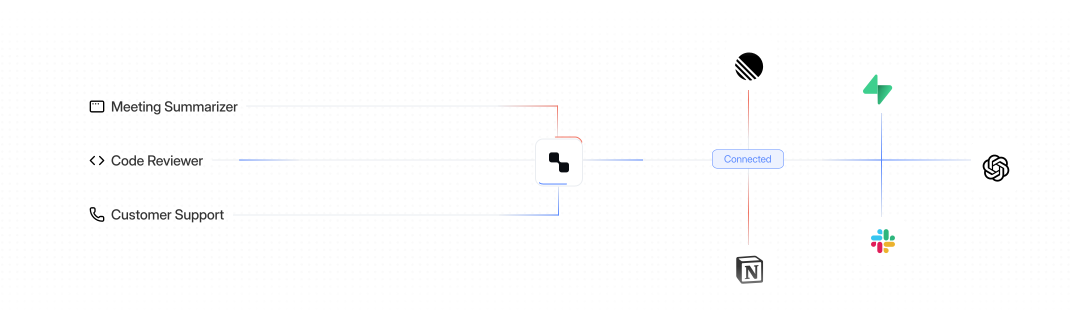
Alyna works across Slack, Teams, email, calendar, docs, tickets, and more. One assistant that handles daily briefs, calendar management, research, travel planning, and any task you delegate - all from the tools you already use.
You're always in control
Alyna drafts, suggests, and queues everything for your review. Nothing sends without your approval - you have full control.
Complete audit trail
Every action includes what happened, when, and why - plus the approval that triggered it. Full transparency and compliance.
Voice calls available
Call Alyna for daily briefs and urgent updates. Voice minutes are metered so your spend stays predictable.
Real scenarios
How busy executives use Alyna every day
Stop context-switching between email, Slack, calendar, and docs. Ask Alyna anything - get briefs, draft replies, surface blockers, and handle follow-ups. Everything is queued for your approval, so you stay in control while saving hours daily.
Never miss what matters
"Call me at 6am with today's critical items, any urgent emails I haven't seen, and what's at risk if I don't respond today."
Voice briefs on demand, anytime.
Stay on top of everything
"What did I miss while I was in back-to-backs? Show me the important Slack threads, emails that need my input, and any calendar conflicts."
Works across Slack, Teams, Email, and Calendar.
Make decisions faster
"Read the Q4 planning doc and Jira board. What's blocked, what needs my decision, and what can wait? Give me the 3-minute version."
Connects to Confluence, Jira, Notion, and more.
Handle stakeholders while you focus
"Draft a response to this investor email thread - acknowledge their concern, show we're on it, and propose a call next week."
All drafts queued for your approval.
Stay ahead without constant monitoring
"Monitor my top 5 competitors' pricing pages, product launches, and funding rounds. Alert me weekly with any changes and draft a summary of market movement."
Heartbeat monitoring + browser automation + multi-agent research.
Learn more →Gets better the more you use it
"Over time, Alyna learned I prefer 1-3 bullet summaries, never book calls before 10am, always loop in my COO on ops threads, and flag emails from our top 10 customers immediately. No manual training required."
Unlimited memory - learns preferences, style, priorities, relationships.
Learn more →Control
Connected tools. Clear permissions.
Alyna can only act inside tools you connect, and only within the permissions you grant. It drafts and proposes first - then executes after approval, with a clean audit trail.

STEP
Connect
Start narrow. Add tools as you build confidence.
STEP
Ask
Call, message, or ping Alyna. It uses connected context to draft options.
STEP
Approve
You review drafts and proposed actions before anything is sent.
STEP
Receipts
Every action is logged: what happened, when, and why.
Use Cases
Everything your executive assistant handles - automated
From morning briefs to stakeholder communications, Alyna handles the tasks that eat up your day. Email triage, calendar coordination, meeting prep, research, and follow-ups - all drafted and queued for your review. Nothing sends without your approval.
Benefits
Built to feel like a real assistant
Not a chatbot. Not another dashboard. Alyna handles routine cognitive work inside your tools - drafts and queues for approval, with full receipts.
Start the day with a plan
A short daily brief with the 3 - 5 actions that matter, not a wall of text.
Fewer context switches
Alyna works where you already operate: Slack/Teams, email, calendar, and voice.
Less dropped work
Turn meetings and threads into queued follow-ups ready to send after approval.
Executive dashboard
Always in control
Approval-first by default. Drafts and queues - nothing sends without your approval.
Receipts included
Full audit trail: what happened, when, and why - so you can trust delegation.
Predictable cost
Task credits and voice minutes - clear previews, no surprise spend like a salary.
What leaders say after adopting Alyna

"We didn’t need “AI magic” - we needed fewer dropped threads. Alyna keeps our inbox and calendar moving, drafts what we would have written, and waits for approval before anything goes out."

James Fincher
CEO, Fincher & Co
60min
back per day
Pricing
Simple, transparent pricing
Free
Get meaningful usage, no card required
Pro
PopularFor founders and busy professionals
Executive
Voice included, higher limits
FOR SECURITY-FIRST TEAMS
Approval-based, auditable by design
Nothing sends without approval. Every email, calendar change, and message is drafted and queued for review, then logged with a clear audit trail - so you can delegate without giving up control.
Talk to salesWhat Alyna won't do:
- • Won't send without approval
- • Won't take destructive actions
- • Won't connect tools you didn't authorize
FAQs
Frequently Asked Questions
Short, direct answers for security reviews and skeptics. If you need more detail, talk to us.
An AI executive assistant you can call, message, or ping - across Slack/Teams, email, calendar, WhatsApp, and voice.
Product
AI Chief of StaffAI Executive AssistantAlyna vs ClawdbotAlyna vs OpenClawAlyna vs NemoClawAlyna vs MerlinPricingLegal
Privacy PolicyNewsletter
Product news and behind-the-scenes updates.