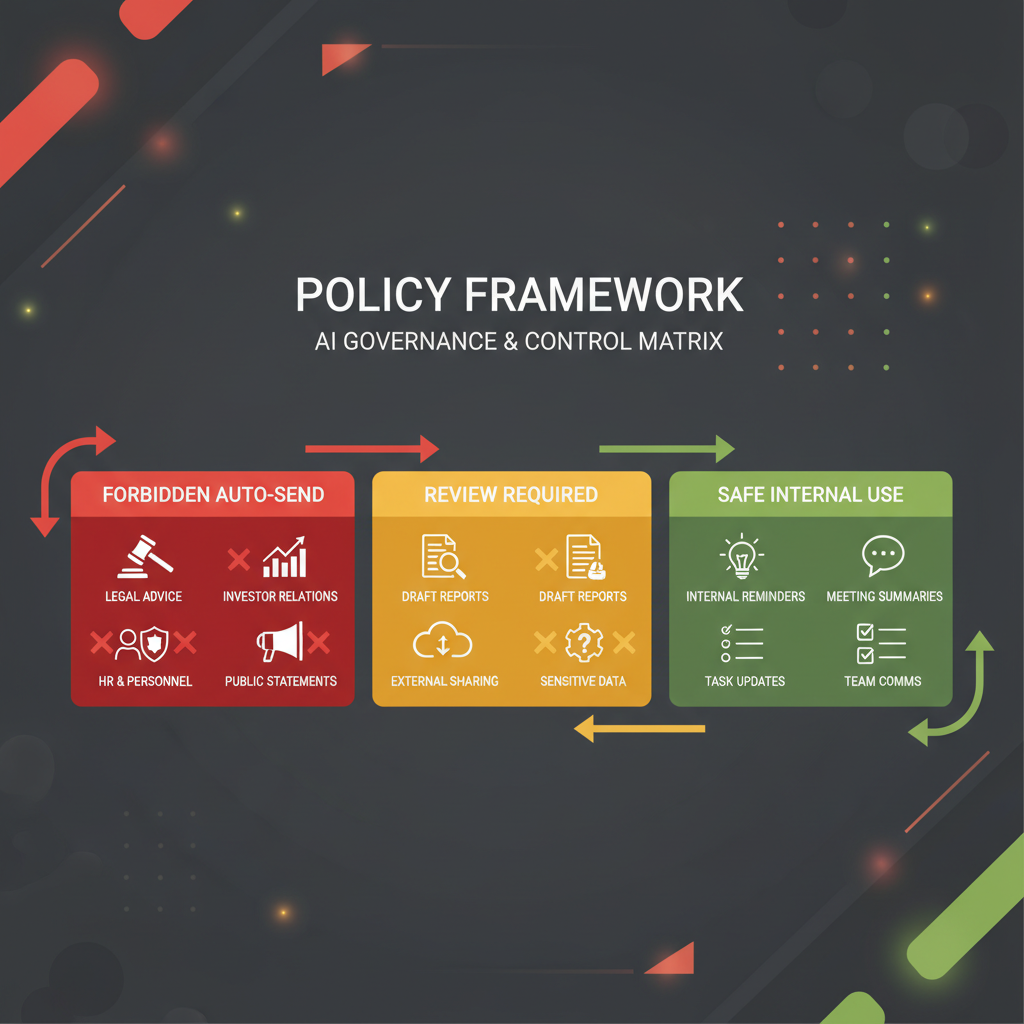
An AI executive assistant should never auto-send anything that creates a new commitment, changes your legal or financial posture, materially affects a relationship, or would be hard to reverse if it is wrong. That is the practical rule. In policy terms, the safest operating model is red-yellow-green. Green items may be auto-drafted and, in tightly bounded cases, auto-routed internally. Yellow items may be drafted automatically but require human approval before they leave your system. Red items should never auto-send at all; they should escalate to a named human owner. This is not a conservative edge case. It is where serious governance is moving. NIST's Generative AI Profile, the EU AI Act's Article 14 on human oversight, the OECD's guidance on AI in the workplace, OpenAI's agent guidance, and Singapore's 2026 Model AI Governance Framework for Agentic AI all point in the same direction: constrain autonomy, preserve oversight, and make interruption and override real.
If you want the product framing behind this policy, compare it with Alyna's AI executive assistant, AI Chief of Staff, and the broader approval-first case in why approval-first AI assistants win in 2026.
When an AI assistant drafts a message, it is helping. When it sends a message, it is exercising delegated authority.
That distinction is the whole policy issue.
Auto-send is not just a speed feature because every send can do one or more of the following:
- create a commitment
- alter timing or expectations
- imply approval
- disclose information
- affect a relationship
- move money, people, or reputation
This is why the debate should never be framed as "Do you trust the model?" The real question is:
"Which classes of authority are we willing to delegate without review?"
In most executive environments, that list should be short.
The EU AI Act's Article 14 is useful even beyond formally high-risk deployments because it spells out the core human-oversight posture serious buyers increasingly expect: people must understand the system's capacities and limitations, interpret outputs correctly, override or reverse them, and interrupt the system when needed. That logic maps directly to executive assistant workflows.
This is the simplest durable policy for executive offices.
| Zone | Default rule | Typical examples | Auto-send allowed? |
|---|
| Green | Low consequence, reversible, mostly internal, standardized | Internal meeting summaries, reminder routing, prep packets to self, internal task creation, low-risk internal nudges | Sometimes, if tightly bounded and logged |
| Yellow | Moderate consequence, external or cross-functional, but structured enough for drafting | Scheduling proposals, low-stakes follow-ups, routine vendor coordination, standard stakeholder updates | No. Draft automatically, but require human approval |
| Red | High consequence, relationship-sensitive, legal, financial, reputational, or difficult to reverse | Investor notes, legal replies, personnel matters, contract language, pricing promises, payments, public statements | Never |
If your team remembers only one thing, remember this:
Green can automate. Yellow can draft. Red must escalate.
That is the right executive default.
Before you allow any workflow to auto-send, run it through this six-part screen:
| COMMIT factor | Question | If "yes," the item is at least yellow |
|---|
| C: Commitment | Does the message create a new promise, deadline, or expectation? | Human review required |
| O: Obligation | Could the recipient interpret it as approval, authorization, or acceptance? | Human review required |
| M: Money | Does it affect spending, pricing, reimbursement, or commercial terms? | Human review required, usually red |
| M: Meaning | Could tone, sequencing, or nuance materially change the outcome? | Human review required |
| I: Information | Does it contain confidential, sensitive, or context-dependent information? | Human review required |
| T: Trust | Would a mistaken send damage trust with a stakeholder, team member, or market audience? | Human review required, often red |
The COMMIT test matters because executives do not usually get burned by generic drafting errors. They get burned when the assistant sends something that commits, signals, or implies more than intended.
These are the categories that a serious executive assistant should never auto-send.
Anything that touches capital, governance, performance framing, or fundraising should stay human-controlled. A small wording change can change expectations or imply a position that was never approved.
Examples:
- investor update emails
- board follow-ups
- performance explanations
- fundraising outreach
- diligence responses
If the send could affect legal interpretation, regulatory exposure, contractual posture, or record integrity, it should never leave automatically.
Examples:
- responses involving legal disputes
- contract language or redlines
- policy exceptions
- regulatory or audit communications
- anything involving incident disclosure
NIST's Generative AI Profile exists because trustworthiness and risk management cannot be treated as afterthoughts in real systems. Executive messaging is one of the clearest places where those controls must show up in practice.
Executive assistants should not auto-send messages about hiring, compensation, performance, conflict, investigations, leave, or disciplinary issues.
Examples:
- rejection or offer language
- performance correction notes
- organizational change messages involving individuals
- HR escalations
- conflict mediation follow-ups
These are not just "sensitive" because of privacy. They are sensitive because tone, timing, and social interpretation are part of the outcome.
Anything that approves payment, confirms reimbursement, agrees to pricing, or changes financial expectations should be human-controlled.
Examples:
- invoice approvals
- expense exceptions
- purchase authorizations
- pricing concessions
- payment or transfer confirmation
Singapore's 2026 agentic AI governance framework is especially relevant here because it explicitly emphasizes selecting appropriate use cases, limiting autonomy, and defining where human approval checkpoints belong.
Never let an executive assistant auto-send anything that can become public narrative.
Examples:
- media responses
- thought-leadership posts
- crisis response statements
- customer escalations likely to be shared externally
- community or public commitments
The reason is simple: public communication is not just information transfer. It is narrative management.
This one is underappreciated. Scheduling is not always a low-risk admin task. For executives, some calendar moves are social signals, commercial choices, or sequencing decisions.
Never auto-send:
- investor or board reschedules
- cancellations of high-stakes stakeholder meetings
- meeting changes that imply de-prioritization
- travel and meeting changes that affect multiple senior participants
Microsoft's own Copilot scheduling documentation is helpful here. The feature is useful, but even Microsoft constrains automatic rescheduling to bounded cases such as personal appointments and 1:1s, and documents limits around shared calendars, longer events, and expanded attendee sets (Microsoft Support). The lesson for buyers is not that automation is bad. The lesson is that safe automation requires explicit boundaries.
Yellow is where many teams get sloppy. They either treat yellow as green because the work feels repetitive, or treat yellow as red and lose most of the productivity benefit.
Yellow is the right zone for:
- low-stakes external scheduling proposals
- routine vendor follow-ups
- standard post-meeting thank-yous
- non-sensitive stakeholder updates
- recurring external coordination that still benefits from a human glance
The rule for yellow is:
Auto-draft is fine. Auto-send is not.
That is not because the AI cannot produce a good draft. It is because the final act of sending still creates a commitment or a signal.
This is where approval workflows for executives and the broader case for approval-first AI assistants become operationally important. Yellow work needs to move fast, but it still needs a human checkpoint.
Green should be narrower than most vendors imply, but broader than cautious executives sometimes assume.
Good green examples include:
- internal summaries sent to the executive or EA
- internal reminders based on approved workflows
- prep packets and meeting briefs
- internal task creation
- internal routing to the right person or system
- status pings inside a closed workflow with pre-approved templates
Even green should follow four rules:
- It stays mostly internal.
- It is easy to reverse or correct.
- It uses a stable format or policy.
- It is logged and reviewable.
If those conditions are not true, it is probably yellow.
If you are an executive, chief of staff, EA leader, or CIO evaluating this category, your team should write a short explicit policy. Not a vague statement like "human in the loop," but a real send-governance rule set.
At minimum, define:
| Policy element | What to specify |
|---|
| Disallowed auto-send classes | Red categories that can never be sent automatically |
| Approval classes | Yellow categories that may be drafted but must be approved |
| Permitted auto-send classes | Green categories with clear boundaries |
| Named owners | Who reviews yellow, who owns red, who can override |
| Escalation triggers | What causes the assistant to stop and ask |
| Audit trail requirements | What must be logged: draft, approval, edit, send, override |
| Kill switch | How automation is paused when risk or errors appear |
This maps closely to the direction of modern agent guidance. OpenAI's guide emphasizes clearly defined guardrails and the need for systems to halt execution and return control when appropriate. Singapore's 2026 framework adds practical emphasis on limiting an agent's autonomy, tools, and data access before deployment. These are not theoretical requirements. They are exactly what executive offices need.
Executives should be skeptical of vendors that say "human in the loop" without defining the loop.
For executive-assistant workflows, real human oversight means:
- the reviewer understands what the system can and cannot do
- the reviewer can see the full proposed output before it leaves
- the reviewer can edit, reject, or reroute it
- the system can be stopped quickly
- audit history makes it obvious what was drafted, approved, changed, and sent
That is also the spirit of the EU AI Act's Article 14: oversight must be proportionate to risk and autonomy, and people assigned oversight must be able to understand limitations, override outputs, and intervene or halt the system.
In executive settings, that standard is useful even when the workflow is not legally classified as high-risk AI.
If you want a simple default policy, use this:
- Green: internal-only summaries, reminders, routing, and prep material
- Yellow: routine external coordination and other structured drafts that still create signals or commitments
- Red: anything involving money, legal exposure, personnel, investors, board, crisis communications, or high-stakes calendar moves
Then add one more rule:
If the assistant is unsure whether an item is green, it must treat it as yellow or red and escalate.
That one line prevents a lot of damage.
This article argues for a conservative executive default, but there are real edge cases.
A strict no-auto-send posture may be too narrow when:
- the workflow is fully internal and highly standardized
- the message uses approved templates with very limited variance
- the consequence of error is trivial and easy to reverse
- the automation is closed-loop and logged
- the human reviewer would add almost no value relative to the delay
Examples might include internal reminders, prep packet distribution, or low-risk workflow notifications to a defined internal group.
But that does not change the executive rule. For executive assistant use cases, the moment a send shapes an external relationship, a commercial expectation, or a sensitive internal matter, governance should tighten again.
An AI executive assistant should never auto-send what your organization has not consciously decided to delegate.
That means:
- green for low-consequence internal automation
- yellow for auto-drafted but human-approved coordination
- red for anything that creates commitments, touches legal or financial posture, shapes relationships, or would be expensive to reverse
This is not anti-automation. It is how mature executive teams get the speed of AI without accepting hidden authority transfer. The right assistant does not just move fast. It knows when not to press send.
Sometimes, but only in tightly bounded green cases, and those are rarer than many teams think. Most external executive communication belongs in yellow or red because the act of sending creates a commitment or a signal that deserves human review.
Use a red-yellow-green model. Green can automate internally in narrow cases, yellow can draft but must be approved, and red should never auto-send at all. That is the clearest way to align AI speed with executive accountability.
Because scheduling is often not neutral. For executives, moving or confirming a meeting can signal priority, change stakeholder expectations, or create commitments that are harder to reverse than the software UI makes them appear.
They define approval as a product feature instead of a governance rule. If nobody has written which classes are green, yellow, and red, the team is relying on habit and hope rather than policy.
Alyna is built for an approval-first executive model: draft broadly, escalate intelligently, and never hide consequential actions behind silent automation. See why approval-first AI assistants win in 2026 and approval workflows for executives for the operating design behind that approach.